Redeem a student's points for a privilege
A student spends their points on a privilege from your list, for example picking their seat. The exchange happens on your "Points" page, one student at a time. The points leave their total; the privilege's name stays in the history.
Redeem
- Under "Who?", tap the face of a single student.
- The "Redeem" button appears to the right of "Give points". It only exists when exactly one face is picked. Tap it.
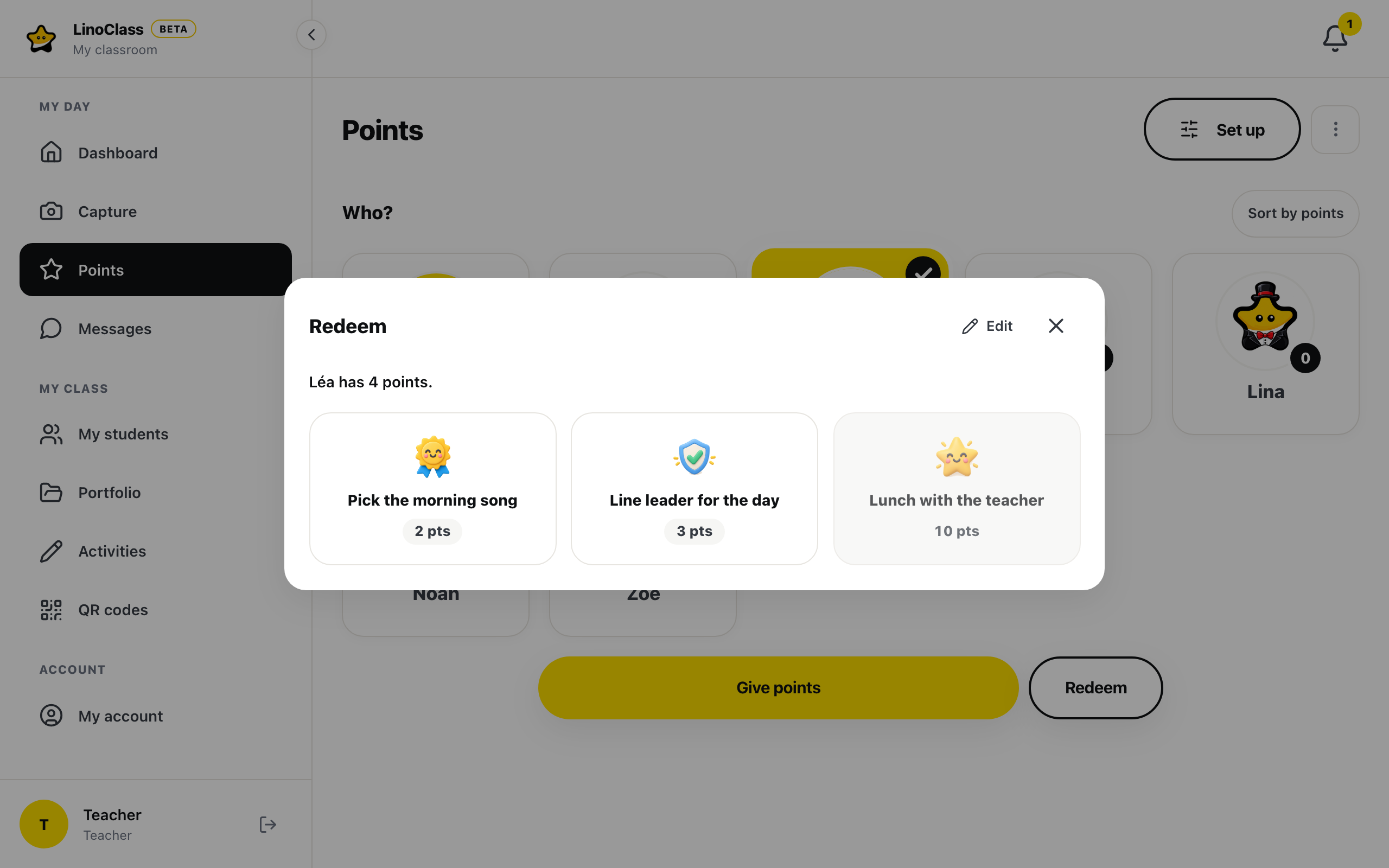
- The "Redeem" dialog opens. A sentence says how many points the student has. Your privileges follow as cards: the badge, the name, then the cost in points, for example 5 pts.
- Tap a privilege. That tap makes the exchange. There is no confirm button.
The dialog closes. A green bar confirms with "{name} redeemed {count} points", where the first name and the cost replace {name} and {count}. There are no stars and no sound. The bubble on the child's card shows the new total.
A privilege the student cannot afford is greyed out and does not respond. It becomes active again once their total reaches the cost. The "Close" X, or the Escape key, closes the dialog without spending anything.
On the tablet, the student finds the exchange under "My trades", with the privilege's name and the points spent.
When the exchange does not go through
"{name} does not have enough points ({balance} on the account)."
The child's total is lower than the cost. This happens when the total on the card was out of date at the moment you tapped. The dialog stays open and nothing was spent. Close the dialog and reopen the "Points" page to see the current total, then try again.
"Saving failed. Try again."
The exchange was not saved. Check the connection, then tap the privilege again.
The dialog has no privileges
Your list is empty. Tap "Edit", at the top of the dialog, to open "Manage points" on the "Privileges" tab and add one. When you close "Manage points", the "Redeem" dialog comes back on its own. A collaborator does not have the "Edit" link: the list belongs to the classroom's own teacher.
Frequently asked questions
The "Redeem" button does not appear.
It only appears when a single face is picked. With two faces or "Whole class", it is not there. Unpick the other students.
Can I undo a redemption?
There is no button for that. The green bar after a redemption has no "Undo". To give the points back, give the student a challenge of the same value from "Give points".
Can I take away a number of points without a privilege?
Not from "Redeem". Create a challenge with a negative value in "Manage points", then give it like any other.
Can the student redeem on the tablet?
No. Their "My points" page shows the privileges and their cost, but the exchange happens on your screen.